LLM · Classification · Evaluation
Things I learnt asking Jev questions for 2 weeks
Two weeks ago, TypeSafe AI released Jev, a model that doesn’t write text but makes decisions about it. Before starting to really use it, I read a lot of blog posts about it, ranging from “it’s just a classification model” to “it’s the next big thing!”. So I decided to test it myself, with the docs open next to me.
Most of my tests are re-runs of other people’s experiments, to see if their conclusions hold with data different than theirs as well as to draw my own lessons on the usage of Jev. The main source is Archer Hume’s blog post, Jev’s Architecture Unmasked, in which he spent around 10,000 API calls studying how Jev behaves in different situations (I really recommend you to read it). I re-ran his tests with more trials and added a few of my own.
Now, tow weeks after the initial tests, I use Jev quite differently, and this blog post shares the lessons behind that change. This post is not an introduction to Jev, TypeSafe’s docs do that well.
All the requests in this post were run using jev-1.13.0.
Before getting started
Here’s a little introduction if you’ve never used Jev yet. As an input, you send Jev a some text, which TypeSafe calls the state, and you ask it questions about it.
A question can be:
- a Noul: a yes/no question, you get the probability of yes
- a Choice: pick one option from your list, you get a probability per option
- a Score: place the text on your scale, you get a probability per level.
This score thing was the most ambiguous for me at first… We’ll talk about it later in the blog post.
In the same request, you can ask Jev many questions about a same state. Imagine having a ticket incoming to the customer support, and you want to know:
- To what department should the ticket be routed
- If the customer is frustrated
- If the ticket is urgent
The ticket text would be your state and the questions, well, would be the questions you send to Jev.
from typesafe_sdk import Choice, Noul, Score, TypeSafeClient

# The state
ticket = ("I've been trying to connect Stripe for 3 days "
          "and it keeps failing. Help ASAP.")

with TypeSafeClient(model="jev-1.13.0") as client:
    r = client.system_one(state=ticket, questions={
        # Multiple choice question
        "department": Choice(
            instructions="Which team should handle this",
            criteria={
                "billing": "Payment or subscription issues",
                "technical": "Bugs or integration problems",
                "sales": "Pricing or account questions",
            },
        ),
        # A score question
        "frustration": Score(
            instructions="How frustrated the customer appears",
            criteria=["Calm", "Frustrated but civil", "Very angry"],
        ),
        # A boolean question, you get the probability for yes
        "is_urgent": Noul(instructions="The message conveys urgency"),
    })

a = r.answers
print(a["department"].choice, a["department"].probabilities)
print(a["frustration"].score, a["frustration"].probabilities)
print(a["is_urgent"].noul)
technical {'technical': 0.79, 'billing': 0.21, 'sales': 0.0}
1.01 {0: 0.0, 1: 0.99, 2: 0.01}
1.0Jev comes back with the following:
- the ticket goes to
technicalat a probability of 0.79 - the customer is “Frustrated but civil” (level 1, at 0.99)
- the message is urgent at 1.00.
The whole request costs 401 input tokens, at $0.042 per million.
Here is what happens behind such a request, and it’s worth keeping in mind for the rest of the post:
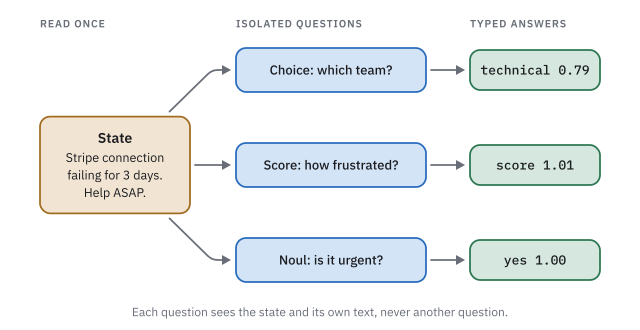
Jev reads the state once, then answers each question on its own. Each question sees the state and its own text, and doesn’t see anything else, not even the other questions.
The example above is adapted from TypeSafe’s docs.
1 “Jev can’t hallucinate” !
TypeSafe’s docs say that Jev “can’t hallucinate”. What is true is that Jev always answers with one of the options you give it and you’ll never get a label that you didn’t define.
But what happens when the text doesn’t contain the answer?
Let us ask Jev which country a customer is talking about, with three messages that name a capital, and one that names nothing:
client = TypeSafeClient(model="jev-1.13.0")

countries = {
    "fr": "France",
    "ma": "Morocco",
    "es": "Spain",
}
question = {"country": Choice(
    instructions="Which country does this refer to?",
    criteria=countries,
)}

texts = ["Shipping to Paris keeps failing at checkout.",
         "Shipping to Rabat keeps failing at checkout.",
         "Shipping to Madrid keeps failing at checkout.",
         "Shipping keeps failing at checkout."]

for text in texts:
    answer = client.system_one(text, question).answers["country"]
    print(answer.choice, answer.probabilities)
fr {'ma': 0.0, 'es': 0.0, 'fr': 1.0}
ma {'es': 0.0, 'fr': 0.0, 'ma': 1.0}
es {'ma': 0.0, 'es': 1.0, 'fr': 0.0}
fr {'ma': 0.3, 'fr': 0.59, 'es': 0.11}The first three answers are right: Paris is in France, Rabat in Morocco and Madrid in Spain. The last one is completely false. The message doesn’t mention any country, yet Jev answers France, with a probability of 0.59. An honest answer would have spread the probability evenly, about 0.33 for each of the three countries.
Here, 0.59 is low enough that a strict threshold, say 0.8, would catch it, but Jev isn’t always that “cautious”.
I tried six questions of this kind (the customer’s plan, payment method, device…), and when the fact was missing from the message, Jev still put 0.79 on its made-up answer on average. For example, I asked it which plan a customer is on while giving it this state “I can’t log in.” and 3 choices free, pro & entreprise, it answered the free plan, at a probability of 0.96.
The OOD calibration test found the same thing at a larger scale. On a question the text couldn’t answer, Jev was right only 44.7% of the time while giving its answer 0.74 on average.
So, when no answer qualifies, because Jev has to distribute the probabilities and make them sum to 1, this really messes up things. The conclusion is that in such a case, you can’t rely on the probability, a made-up answer can look just as sure as a real one. This doesn’t mean that Jev never gets probabilities right when it doesn’t have enough information, it just means that probabilities aren’t that reliable in the case of absence of information.
The way to fix this is to give Jev a way out, an option that means “the text doesn’t say”.
question = {"country": Choice(
    instructions="Which country does this refer to?",
    criteria=countries | {"not_stated": "The text doesn't say"},
)}
fr {'fr': 1.0, 'not_stated': 0.0, 'es': 0.0, 'ma': 0.0}
ma {'fr': 0.0, 'not_stated': 0.01, 'ma': 0.99, 'es': 0.0}
es {'ma': 0.0, 'es': 1.0, 'not_stated': 0.0, 'fr': 0.0}
not_stated {'es': 0.0, 'not_stated': 1.0, 'fr': 0.0, 'ma': 0.0}Jev still finds France, Morocco and Spain when their capital is mentioned, and answers “the text doesn’t say” when no city is. This also worked with other tests where information was missing. Since then, I add such an option to every Choice. It’s the cheapest way to detect that the information simply isn’t in the text.
In one of the RAG systems I developed in the past, I was trying to classify incoming queries into pre-specified families of queries. The classification was done using GPT-4o.
I decided to add an “unknown” category to have queries that shouldn’t land in any of the pre-specified categories go into the “unknown” category. This turned out to be a bad idea as GPT-4o started using it so often, even for queries that should have landed in one of the pre-specified categories.
2 Don’t ask Jev the big question
The results presented in this part aren’t mine but it’s a very useful one. This part talks about the kind of questions that Jev can’t answer. These are usually questions that demand some reasoning effort.
What Jev docs put forward is the idea that complex questions need to be split into simple questions that might lead to the answer of the big complex question.
A phishing study compared Jev with Claude Haiku 4.5, a small LLM, on 2,000 emails and it used one broad question, “Is this email phishing?”. Jev was clearly worse: 62.6% right, against 81.3% for Haiku.
Then the broad question was split into five small ones, each checking one sign of phishing, and a small model (a logistic regression trained on 1,000 labeled emails) learnt how much weight to give each answer.
With this setup, Jev got 95.0% right, on par with Haiku answering the same five questions (93.2%) for much less money. But to be fair, part of the jump comes from the 1,000 labeled emails used to train the small model, and not only from splitting the question.
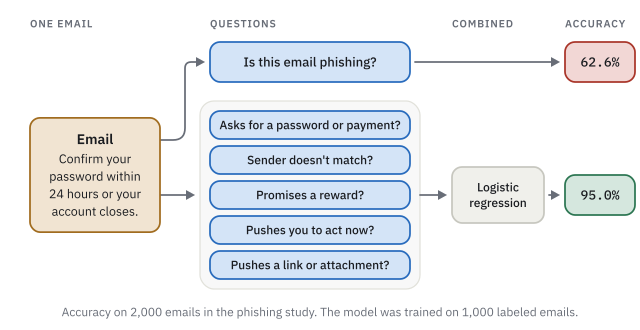
The study didn’t publish its five questions, so the ones in the picture are mine. Let us ask them on two emails, a fake bank asking for a password and a colleague sending slides, with the broad question in the same request so we can compare:
broad = {"phishing": Noul(instructions="Is this email a phishing attempt?")}
small = {
    "credentials": Noul(instructions="Does the email ask for a password, code or payment details?"),
    "sender": Noul(instructions="Does the sender look inconsistent with who they claim to be?"),
    "reward": Noul(instructions="Does the email promise money, a prize or a refund nobody asked for?"),
    "pressure": Noul(instructions="Does the email pressure the reader to act now or face a penalty?"),
    "link": Noul(instructions="Does the email push the reader to a link or attachment?"),
}

emails = {
    "fake_bank": (
        "From: Security Team <security@bnp-paribas-verify.com>\n"
        "Subject: Your account will be suspended\n\n"
        "We detected unusual activity on your account. Confirm your password and card number "
        "within 24 hours at https://bnp-paribas-verify.com/login or your account will be closed."
    ),
    "colleague": (
        "From: Julie Martin <julie.martin@acme.com>\n"
        "Subject: Slides for Thursday\n\n"
        "Hi, the slides for Thursday's review are attached. Let me know if anything is missing. Julie"
    ),
}

answers = {name: client.system_one(email, broad | small).answers for name, email in emails.items()}

print(f"{'':12} {'fake_bank':>10} {'colleague':>10}")
for question in broad | small:
    print(f"{question:12} {answers['fake_bank'][question].noul:>10.2f} {answers['colleague'][question].noul:>10.2f}")
fake_bank colleague
phishing 0.98 0.09
credentials 0.99 0.01
sender 0.92 0.09
reward 0.01 0.01
pressure 0.98 0.04
link 0.99 0.90On emails this obvious, the broad question gets it right too (0.98 and 0.09). The gap in the study comes from the harder emails, and two examples won’t show it.
What the example does show is that no single small question decides on its own. Julie’s slides get 0.90 on link, because an attachment is exactly what that question asks about. That’s why the five answers go into a small model that learns how much each one counts.
If you don’t have any labelled data, you can set weights for yourself to start with based on some domain knowledge or you can label it using some good LLM, train the logistic regression on it to get weights and then use them with Jev.
The idea is: Break the complex question into small things you can check one by one, and combine the answers in your code.
TypeSafe’s build guide calls this its most important idea, and its list of known weaknesses tells you what to keep out of Jev entirely: counting, comparing numbers and dates.
3 Where you put your text matters
So, we’ve established earlier that Jev reads the state once, and each question only sees the state and its own text.
Archer Hume ran two tests around this, and I re-ran both with more trials and different examples.
A question can’t see what’s written in another question.
Let us write a refund policy inside one question, and ask a second question in the same request whether the customer can get a refund:
message = "I bought these headphones 20 days ago and they stopped working. Can I get my money back?"
policy = "Refunds are only possible within 7 days of purchase."

# The policy is written inside the first question
a = client.system_one(message, {
    "wants_refund": Noul(instructions=f"{policy} Is the customer asking for a refund?"),
    "eligible": Noul(instructions="Can the customer get a refund under our refund policy?"),
}).answers
print(a["eligible"].noul)

# The same policy, written in the state
a = client.system_one(f"{policy}\n\n{message}", {
    "wants_refund": Noul(instructions="Is the customer asking for a refund?"),
    "eligible": Noul(instructions="Can the customer get a refund under our refund policy?"),
}).answers
print(a["eligible"].noul)
0.49
0.03With the policy written inside the first question, the second question never sees it and answers 0.49, meaning it simply doesn’t know. Once the policy is in the state, both questions can read it, and the answer drops to 0.03, since 20 days is more than the 7 days the policy allows.
So if several questions need the same piece of information, like this refund policy, put it in the state, otherwise only the question it’s written in will ever see it.
Asking more questions costs almost nothing.
Since Jev reads the state only once, adding questions barely changes the time a call takes. In my runs, the server took between 61 and 69 ms whether I asked 1 question or 100 about the same state.
So ask everything you need in a single call, even the questions you’ll only look at in some cases. Say you only need to know if an item arrived damaged when the customer asks for a refund.
Instead of waiting for the first answer before asking the second question, ask both at once and let your code decide which answer to read. This will lower the latency of your system and the cost of using Jev.
message = "The mug arrived in pieces, I want my money back."

# One call, both questions
a = client.system_one(message, {
    "wants_refund": Noul(instructions="Is the customer asking for a refund?"),
    "damaged": Noul(instructions="Did the item arrive damaged?"),
}).answers

# Your code decides which answer to read
if a["wants_refund"].noul > 0.5:
    print("refund asked, item damaged:", a["damaged"].noul)
refund asked, item damaged: 0.96Jev answered both questions in the same call, and the code reads damaged only because the customer asked for a refund. TypeSafe calls this pattern fan-out.
There’s one limit though to this pattern , which is since your questions can’t see each other, the second question can’t use the first one’s answer, so that logic stays in your code, like the if above.
4 Confidence is not what you think it is
For a Choice or a Score, Jev also returns a confidence, a number between 0 and 1. It’s tempting to read it as “the chance that Jev is right” but this is not the right interpretation of this number.
It only rescales the probability of the winning option: 0 when all options are equally likely, 1 when the winner gets all the probability.
Archer Hume found the exact formula in TypeSafe’s code. I tested the formula from the probabilities that Jev yields and it matched all the cases I checked, give or take rounding:
\text{confidence} = \frac{K \cdot p - 1}{K - 1}
where K is the number of options and p is the probability of the winning option.
You can read confidence as a distance. A model that is only guessing puts the same probability on every option, 1/K, so 0.33 each with three options. Confidence says how much of the way the winning option has traveled from that guess toward certainty (1.00). Writing the same formula another way shows it:
\text{confidence} = \frac{p - 1/K}{1 - 1/K}
With three options, that gives this scale:
| Top probability | What it looks like | Confidence |
|---|---|---|
| 0.33 | a pure guess | 0.00 |
| 0.40 | barely better than a guess | 0.10 |
| 0.85 | a clear winner | 0.78 |
| 1.00 | certain | 1.00 |
The thing you’ve got to pay attention to though is that the number of options is part of the formula. Take a Choice with three options where the winner gets 0.40: its confidence is 0.10.
Now add a fourth option, other, which gets no probability at all. Let’s say that the winner still has a probability 0.40, the confidence doubles to 0.20. With four options, a pure guess puts 0.25 on each option instead of 0.33, so the same 0.40 is now further away from a guess.
Nothing changed in Jev’s opinion, only the number of options did. You can replicate the calculations in a few lines of Python:
def confidence(k, p):
    return (k * p - 1) / (k - 1)

print(f"{confidence(3, 0.40):.2f} {confidence(4, 0.40):.2f}")
0.10 0.20Adding an option can also change the probabilities of the options that were already there. Here is a question about why a payout (money sent back to a customer, like a refund) failed:
question = Choice(
    instructions="What caused this payout to fail?",
    criteria={
        "bank": "The customer's bank rejected or held the payment",
        "provider": "Our payment provider had an error or an outage",
        "customer": "The customer entered wrong details or cancelled",
        "unknown": "The text doesn't say what caused it",
    },
)
Let us add a fifth option to it, in two different ways:
weather: “Bad weather caused it”, which can’t be the answerdetails: “The customer’s account details were out of date”, which overlaps withcustomer
That gives three versions of the question: the 4 options, the 4 + weather, and the 4 + details. I sent all three the same states, short notes about a failed payout where the cause isn’t certain, and averaged the probability Jev gave each option:
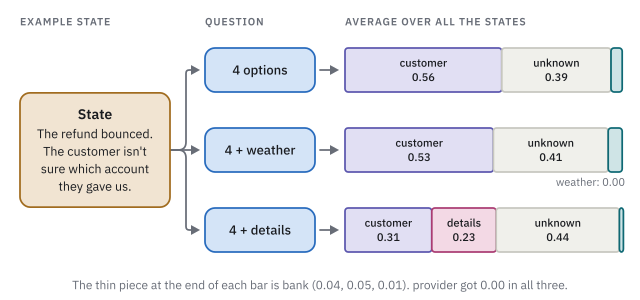
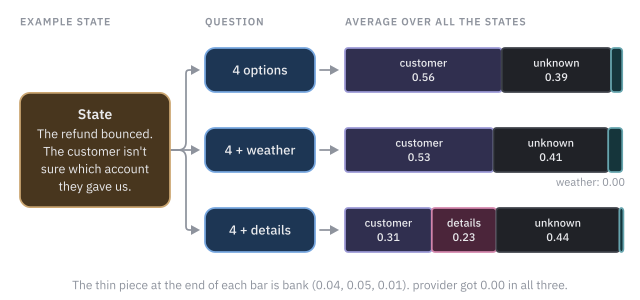
weather got 0.00, as expected, and yet it changed the others: customer went down from 0.56 to 0.53 and unknown went up from 0.39 to 0.41. The change is small, but an option that gets nothing shouldn’t change how the other options compare at all.
details moved things a lot more. It took 0.23, almost all of it from customer, which fell from 0.56 to 0.31, and unknown ended up first with 0.44.
When two options overlap, Jev splits the probability between them, and the split isn’t stable.
If the probability keeps moving between the same two options, look at how they’re written before blaming Jev, and draw the line between them with not_for, as in the next lesson.
So a confidence threshold is only valid for the exact list of options it was tuned on. Each time you add, remove or reword an option, even if it’s just adding other, check your threshold again.
Also, make sure not to use overlapping options: they split the probability between them, so neither one looks sure even when the answer is one of the two, and the split moves when you only change their order.
5 Low confidence ? Look at your options first
To test Jev on real data, I used Banking77, a public dataset of messages sent by customers to a bank. Each message is labeled with one of 77 intents, such as card_arrival or change_pin. I gave Jev the 77 intent names as options with the question “What is the customer asking about?”, and it got 82% of the messages right.
When I read the mistakes, most of them weren’t Jev misunderstanding the message. They came from the options themselves: some intents overlap, and some names only make sense to the people who created the dataset.
The best example is get_physical_card. From the name, you’d expect messages about ordering a physical card. In Banking77, it actually holds messages like “where can user find pin?”. Seeing only the names, Jev answered change_pin, at 0.74. Jev only knows what your words say.
TypeSafe lets you add a description to each option, and one of the fields you can use is not_for, where you say what the option does not cover. So I wrote a one-line description for each of the 77 intents, and added a not_for whenever two intents were getting confused. Here are two of them, shortened:
"get_physical_card": {
    "what": "Finding or getting the PIN for a card",
    "not_for": "Changing an existing PIN (change_pin)",
},
"change_pin": {
    "what": "How or where to change an existing PIN",
    "not_for": "Finding the PIN of a card (get_physical_card)",
},
To keep the test fair, I wrote the descriptions using only Banking77’s training data and half of my messages, then tested them once on the other half, 308 messages:
| Names only | Names and descriptions | |
|---|---|---|
| Accuracy | 82.1% | 88.3% |
Six points of accuracy for a few lines of text, and “where can user find pin?” now comes back as get_physical_card, at 1.00.
Not all mistakes went away, and the ones that stayed taught me something too. “How do I reset my PIN?” is labeled pin_blocked in Banking77, and Jev keeps answering change_pin. Honestly, I think Jev is right on this one. Some of the “mistakes” are mistakes in the labels, so read them before trying to fix the model.
6 What’s the point of a Score ?
A Score asks Jev where the state sits on a scale that you define, from the lowest level to the highest. For example, how severe a customer’s problem is:
severity = Score(
    instructions="How severe is the problem for the customer?",
    criteria=[
        "Cosmetic; no impact to functionality",                 # level 0
        "Broken or degraded feature, but a workaround exists",  # level 1
        "Blocking issue; no workaround exists",                 # level 2
    ],
)
Jev returns a probability for each level, and a score: the average level, weighted by these probabilities. If Jev puts 0.57 on level 1 and 0.43 on level 2, the score is 0.57 × 1 + 0.43 × 2 = 1.43, between “degraded” and “blocking”.
A Choice could also pick one of these three levels, but it doesn’t know that they’re ordered. A Score does, and that’s what it’s for: answers that are a degree rather than a category, like how severe, how urgent or how hard. You can sort states by their score, or act when the score passes a threshold that you tuned on labeled examples, for example escalating every ticket whose severity is above 1.5.
The one thing not to do is read the score as a level. It’s an average: 0.50 on “cosmetic” and 0.50 on “blocking” gives 1.00, which reads as “degraded”, a level that got no probability at all. When the decision matters, you should really look at the probability of each level.
In one of my hobby project, I used a Score to rate how hard a request is in a small LLM router, which sends easy requests to cheap models and hard ones to strong models, and it ranked the prompts almost exactly like I did. Using a Score is adequate to this task as the levels are ordered.
7 Where do I put my threshold ?
A threshold is the confidence above which you let a system like Jev decide automatically, and below which the message goes to a person.
TypeSafe’s docs & examples use different thresholds, 0.6 in one place, 0.75 in another and 0.3 to 0.5 in a third.
They do this because no threshold works for every question, thresholds should be adapted to the use case.
Picking a threshold is a trade-off: the higher it is, the fewer messages Jev decides alone, but usually the more often it’s right on the ones it decides.
What helped me pick one is the automation curve, which shows this trade-off for every threshold.
You take some labeled messages, and for each possible threshold, you compute two numbers:
- the share of messages above the threshold, which Jev would handle alone
- how often Jev is right on those
In Python, it can be done in a few lines:
def automation_curve(results, thresholds):
    """results: one (confidence, is_right) pair per labeled message."""
    for t in thresholds:
        decided = [is_right for confidence, is_right in results if confidence >= t]
        print(f"threshold {t:.2f}: Jev decides {len(decided) / len(results):.1%}, "
              f"right on {sum(decided) / len(decided):.1%}")
Here it is for the Banking77 question, with the names only and with the descriptions from lesson 5:
Each dot is one threshold. From left to right, the threshold goes down: Jev decides more messages alone, and is right less often on them.
To pick a threshold, start from the accuracy you need on the messages Jev decides alone, which depends on what a wrong decision costs you, and take the lowest threshold that reaches it. Say you need 92%:
- with names only, that takes a threshold of 0.90: Jev decides 67.5% of the messages, and a person handles the other 32.5%
- with the descriptions, a threshold of 0.70 is enough: Jev decides 91.2% of the messages, and a person handles only 8.8%
Improving the options did more than any threshold could.
Wrapping up
If I had to sum it all up in one piece of advice, it would be to focus on how you write your options, make them really clear, remove as much overlap between them as possible. Also, look at the probabilities (that’s a second advice, I know!)
While there are many more things I’d like to talk about, this blog post is getting long, so I’ll stop here.
Topics I might cover in an upcoming post:
- building an LLM router with Jev, and why prompt caching changes the math of switching models
- the open-source Jev clones that appeared within a week of the launch
Thanks to Archer Hume for the experiments this post builds on.